Remote check-in & checkout guide for Turo hosts
Learn how to save time checking your guests in and out remotely with these guidelines
Contents
Key security
Keeping your keys secure is one of the most important parts of remote check-in. Following secure key handoff practices helps protect your vehicle, your guest, and your eligibility under Turo's earnings plans. Turo's Terms of Service prohibit leaving a vehicle unlocked or leaving keys unsecured.
The following methods are not permitted:
Leaving your vehicle unlocked with the keys in an unsecured location, such as a cup holder, under a seat, in the wheel well, or near the fuel door.
Giving guests access to your vehicle before they complete identity verification in the app.
Location-specific restriction, LAX Budget Lot: Lockboxes are no longer permitted at the LAX Budget Lot. Hosts who fail to comply may face an airport suspension and/or additional violation fees. You may still use remote unlocking technology to lock and unlock your vehicle remotely at this location.
Why these practices matter
Leaving keys in predictable locations makes vehicles more vulnerable to theft. Predictable hiding spots are easy to find, especially for anyone who's had access to a similar vehicle before or spends time watching parking areas.
When a key is accessed outside Turo's verified handoff process, we may not be able to verify who accessed the vehicle, which can affect claim eligibility.
Hosts who don't securely hand off their vehicles to guests can have their earnings plan voided and may not be eligible for reimbursements.
Why offer remote check-in and checkout
Your personal pit crew, at thousands of locations across the UK
Checking your guests in and out remotely is a great way to save time and be more efficient with your business on Turo. Also guests appreciate the convenience.
In this guide, you’ll learn about:
Key security
Understand what counts as a secure handoff, and what doesn't
Secure remote access
Discover different remote access options
Remote ID verification
Verify your guest’s ID remotely via the Turo app
Best practices for remote sharing
Offer a great guest experience without meeting your guests in person

Options to enable remote access
Share your car when you’re at home or on the go
There are two different ways to offer your guests remote check-in and checkout.
Lockboxes
Lockboxes are an excellent, low-tech way to share your keys. Simply follow these best practices for using lockboxes.
- Place your car key in a radio frequency (RF) signal-blocking pouch if your car uses a non-bladed key (see below for more on RF pouches). Bladed keys can go straight in the lockbox.
- Put your RF pouch inside your lockbox and lock it
- Attach the lockbox to the car or somewhere at the pickup location (a door, fence, etc. — as long as it's your property)
- Message the lockbox code to your guest after they've completed the remote ID verification process (see below for a step-by-step guide).
- Never schedule messages to share your lockbox code with guests.
- Change your lockbox code between every trip. Never reuse the same combination across reservations.
Remote lock and unlock technology
Many cars come with connected car technology built in, and most cars released after 2015 include a way to lock and unlock them remotely. If your car doesn't have this feature, there are third-party options that can add remote lock and unlock capability.
Check whether your car supports remote lock and unlock, either through the car's own app or a third-party option. If it does, be sure to follow the RF pouch recommendations below.
When you're using remote unlocking, message your guest through Turo messaging so you know when to unlock the car for them.

Remember to always include a key!
Use an RF pouch for digital remote access solutions
If your car uses a non-bladed key (like a key fob), you should always store it in a radio frequency (RF) signal-blocking pouch, also known as a Faraday bag, and keep it inside the car (in the glove box, a visor pouch, center console, etc.) for your guest.
Turo requires hosts to give a key to their guests, even when the car is accessed remotely, so the guest can use the car normally during their trip.
Without an RF-blocking pouch, the car could become unlocked, compromising your car’s security.

Remote check-in & ID verification
A step-by-step guide
It’s critical to take precautions to help protect yourself and your car when offering remote check-in. Follow these steps to help create a seamless remote check-in experience.

Step 1: Verify your guest’s license
To help make sure the person picking up the car is the same person who booked it, you must confirm the guest’s license using the photos they submit in the app. Failure to do so could void your protection plan.
To confirm a license, you must check that:
the guest's name and date of birth match the reservation information of the primary guest; we allow guests to cover up their license number and address to protect their privacy
the guest’s face matches the photo on their license
the license hasn’t expired and won’t expire before the end of the trip
the license isn’t altered, unconditional, probational, provisional, or restricted, and it’s not a learner’s permit
If the guest has a foreign or temporary driver’s license, refer to this article to verify their driving eligibility and identity.

Pro tip: Be vigilant about verification
Only hand over your keys or give access to the primary guest and not to additional drivers.
Don’t give the keys to a guest who:
- Hasn’t uploaded the requested ID photos
- Asks for early access to your vehicle, which could void your earnings plan. If they want to access the car earlier than scheduled, ask them to request a trip change in the app.
Step 2: Upload pre-trip photos
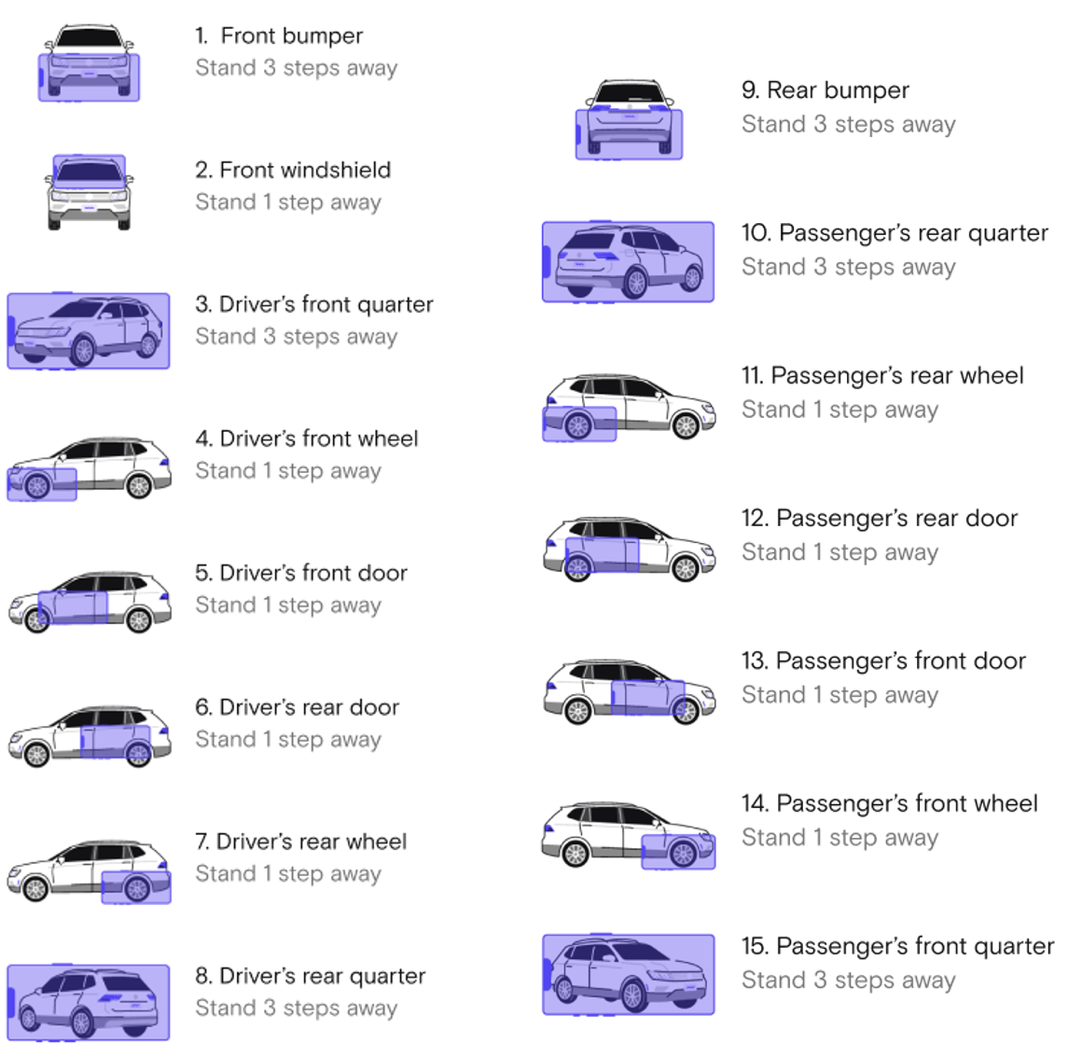
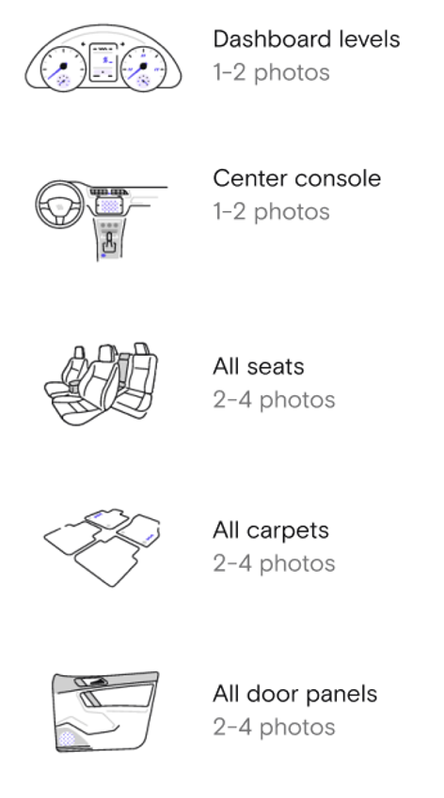
To be covered by your protection plan, you must document the condition of your car before and after each trip. Take clear, well-lit photos that show any pre-existing damage, dirtiness, etc.
Follow this photo checklist to help make sure you’ve documented the car’s condition completely.
Trip photo checklist
Exterior photos
Take at least 15 photos of the outside of your car
Interior photos
Take at least eight photos of the inside of your car
Step 3: Give your guest remote access
After you’ve verified your guest’s identity and uploaded all of the pre-trip photos, you’re ready to give them access to your car!
Whichever remote access solution you’ve chosen, whether via a lockbox code or digital access, message your guest to give them access to the car when the trip is starting — never before the scheduled start time. Do not use scheduled messaging to share the lockbox code with your guest.

Remote checkout
A step-by-step guide
Follow these simple steps after the trip is over.

Step 1: Message your guest
Let them know where to leave the car and where to leave the key. Be sure to communicate this information directly through the Turo app. Don't ask guests to leave keys in unsecured exterior locations, like wheel wells or under wipers.
Step 2: Take post-trip photos
Within 24 hours of the end of a trip, take photos of your car, inside and out, to document its condition, and check if there’s any new damage. You need to file a claim for any new damage within 24 hours for the claim to be eligible for reimbursement as part of your protection plan.
Best practices
For offering remote check-in & checkout
Follow these best practices to help create a seamless experience for your guests.
Let guests know you offer remote check-in
If you offer remote check-in, mention it in your listing description! Highlight this convenient option to your prospective guests to help your listing stand out.
Give clear pick up instructions
Be sure to tell your guests exactly where to find your car and how the remote check-in will work so they know what to expect. Include your lockbox location, and be as specific as possible.
Keep your lockbox code fresh
Change your combination before every trip. A code that's been used by a prior guest is a security risk, especially for hosts sharing vehicles from a fixed location where guests can identify the lockbox placement over time.